The dashboard is the page you land on every time you sign in. It greets you by name, surfaces the next things that need your attention, and gives you a one-glance read on your compliance program — all in one view.
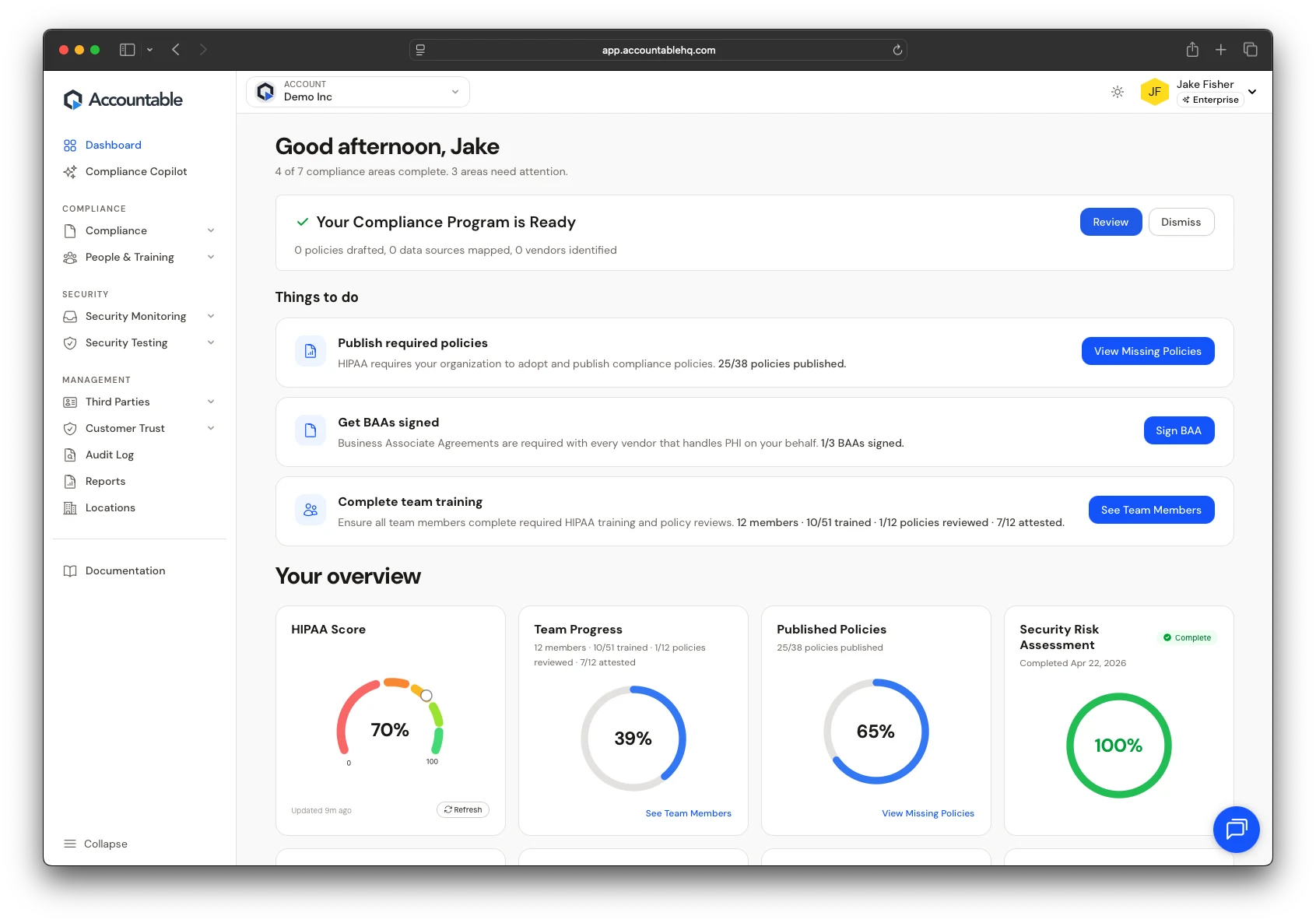
Your dashboard: program status at the top, what to do next in the middle, scoreboard at the bottom.
Three sections, top to bottom
The dashboard is organized so you can answer three questions in order: am I OK right now, what should I do next, and how is my program trending?
1. Status banner
Right under the greeting, a single colored banner tells you the state of your program at a glance.
- Green — "Your Compliance Program is Ready" — your core requirements are met and there are no urgent gaps. Click Review to see what was assessed, or Dismiss to clear the banner until something changes.
- Yellow — areas need attention — most things are in place, but specific gaps need action. The Things to do list directly below shows you which.
- Red — critical gaps — something material is missing (no risk assessment on file, no Privacy Officer assigned, expired BAAs). Address these first.
What 'Ready' actually means
2. Things to do
The middle section is your personal task list — the next 3-5 highest-leverage actions Accountable thinks you should take right now. The header tells you how many compliance areas are complete (e.g., "5 of 7 areas complete, 2 areas need attention").
Each item shows:
- What needs doing — a one-line description (e.g., \"Publish required policies\").
- Why it matters — the HIPAA reasoning behind it (e.g., \"HIPAA requires your organization to adopt and publish policies\").
- Current progress — a fraction so you know how close you are (e.g., \"35/86 policies published\").
- A direct action button — \"View Missing Policies\", \"Sign BAA\", \"See Team Members\" — that drops you exactly where you need to be.
Treat this like email
3. Your overview
The bottom section is a row of circular-progress widgets — one per compliance dimension. At a glance you can see where you're strong and where you're weak.
- HIPAA Score — your overall compliance score (0–100%). This is the headline number. See Your compliance score for how it's calculated.
- Team Progress — how much of your team has completed required training and policy reviews. Largest single component of your score (30% weight).
- Published Policies — the share of required HIPAA policies your organization has published.
- Security Risk Assessment — whether you have a current, completed risk assessment on file. Marked Complete when done.
Each widget is clickable and drops you into the relevant area — clicking <strong>Published Policies</strong> takes you to the Policies tab; clicking <strong>Team Progress</strong> takes you to People & Training.
Personalization
The greeting changes by time of day ("Good morning", "Good afternoon", "Good evening") and uses the first name on your profile. There's nothing to configure — it just works.
When the dashboard updates
The Things to do list and overview widgets recalculate automatically when underlying data changes — when you publish a policy, finish a training, sign a BAA, or close an incident. You can also force a refresh by reloading the page.
If your overview widgets look stale