An incident is anything that may have compromised PHI — a lost laptop, PHI emailed to the wrong person, a malware alert, a phishing click. Accountable walks you through the documentation and response process.
If a breach is in progress, don't start in the docs
Report an Incident from the left sidebar, and start documenting now. You can read this article later.
Reporting an incident
Open the incident form
Click
Report an Incidentfrom the Security Monitoring section in the left sidebar.Capture the facts
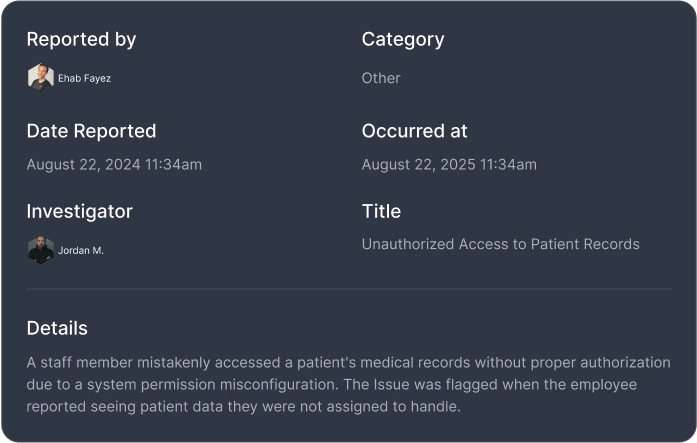
What happened, when, who reported it, what data was involved, what severity level (low, mid, or high). Attach any relevant documents or evidence.
Assign an investigator
Designate who is responsible for investigating and resolving the incident.
Managing the response
Each incident moves through status stages: new → investigating → resolved. As you investigate:
- Update the incident with findings and actions taken
- Follow your response plan steps — Accountable lets you define response procedures by incident category so your team knows exactly what to do
- Log internal communications and decisions
- Attach evidence and documentation
Breach determination
If the incident may constitute a reportable breach, you can request a breach determination through Compliance Copilot. Copilot will draft a recommendation based on the documented facts — but a human admin must explicitly approve or reject the determination before any reporting proceeds. This approval workflow ensures that breach reportability decisions always have human judgment and attestation.
Incident categories and response plans
Under Incident Response in the Security Monitoring section, you can configure incident categories (e.g., unauthorized access, lost device, phishing compromise) and define response plan steps for each. When an incident is reported under a given category, the response plan steps are automatically attached — giving your team a checklist to follow.
What gets logged
- The original report and all updates, with timestamps and authors
- Severity level and status changes
- Investigator assignments
- Response plan step completion
- Attached documents and evidence
- Internal comments and communications
- Any breach determination requests and approvals
Even non-breaches get logged
Data breach monitoring
Under Data Breaches in the Security Monitoring section, Accountable monitors for publicly reported data breaches that may affect your organization or your vendors. If a vendor you work with appears in a breach report, you'll see it flagged — helping you assess whether your data was involved and whether you need to take action.
After the incident
Closed incidents stay in your incident log indefinitely and become part of your compliance reports.